
What Do Various Icons and Symbols Mean on Bumble?
Navigating the Bumble app can sometimes feel like learning a new visual language. With various icons, badges, and notifications, understanding what each symbol means is key to a smooth and successful experience. This comprehensive guide breaks down Bumble icon meanings across all modes (Date, BFF, Bizz), ensuring you never have to guess again.
Why Understanding Bumble App Symbols Matters
Bumble uses a system of icons and badges to communicate status, features, and actions quickly. Knowing these Bumble app symbols helps you manage your connections, understand your profile’s visibility, and use premium features effectively. Whether you’re wondering, “what does the badge mean on Bumble?” or why a chat icon changed color, we’ve got you covered.
Quick-Reference Guide: Bumble Icons & Their Meanings
| Icon/Image | Name | What It Means |
|---|---|---|
| 🐝 | Bumble Logo | The app icon and brand symbol. |
| ☰ or Profile Pic | Main Menu | Opens the settings and mode switcher. |
| 🔍 | Discover/Swipe Mode | The main screen for viewing profiles. |
| 💬 (Grey) | Chats / Hive | Your conversation inbox. Grey means no unread messages. |
| 💬 (Yellow/Green) | Chats / Hive (Active) | You have an unread message or a match waiting for your move (in Date mode). |
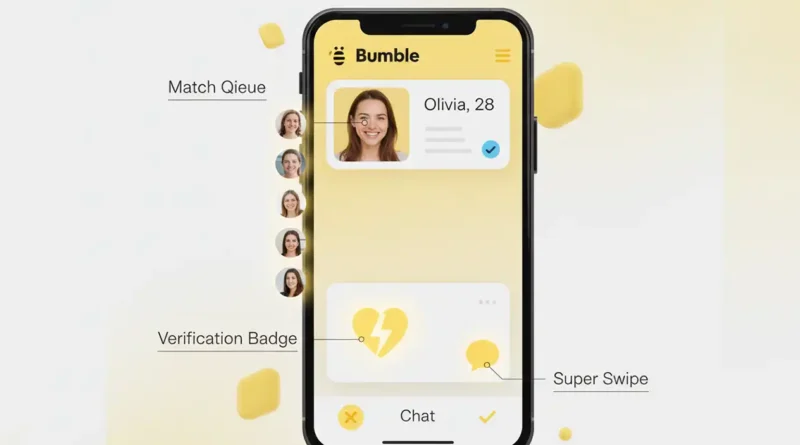
| ❤️ | Matches / Match Queue | Shows people who have liked you. A number indicates new likes. |
| ⭐ | Beeline (Premium) | Access your Beeline—a list of profiles who have already liked you. |
| ✨ | Spotlight (Premium) | Activates Spotlight to boost your profile visibility. |
| ⚡ | SuperSwipe (Premium) | Indicates the SuperSwipe feature to show strong interest. |
| ✅ (Blue) | Verified Profile Badge | Bumble has confirmed the person is real via photo verification. |
| 🏆 | Premium Badge | User has a Bumble Premium subscription. |
| 💚 (Green Circle) | Online Now Status | A green circle around a profile pic means they were recently active. |
| 🎯 | Travel Mode (Premium) | User is using Travel Mode to connect in another location. |
| 🧭 | Incognito Mode (Premium) | User is only visible to profiles they swipe right on. |
| 🤝 | Bumble Bizz Mode | Switched to professional networking mode. |
| 😊 | Bumble BFF Mode | Switched to friend-finding mode. |
Core Navigation & Mode Icons
These are the foundational Bumble mode symbols you’ll use daily.
- Three Lines (☰) or Your Profile Picture (Top Left): This is the main menu. Tap to access Settings, see your profile, switch between Date, BFF, and Bizz modes, and view your purchased features.
- Magnifying Glass (🔍) or “Discover” Tab: This is your primary swipe deck. It’s where you view and swipe on profiles.
- Chat Bubble (💬) or “The Hive”: This is your conversation inbox. Its color is a crucial notification icon:
- Grey: No new activity.
- Yellow/Green: You have an unread message or, in Date mode, a new match where the woman must message first (this is often indicated by a yellow timer ring).
- Heart (❤️) or “Matches”: This is your match queue. A red number badge here shows how many people have liked your profile. Tapping it takes you to your “Connections” page.
Profile Badges & Status Icons (Bumble Profile Icons)
These symbols appear on user profiles and convey important information.
- Blue Checkmark (✅): The Verified Badge. This means the user has completed Bumble’s photo verification process to confirm they’re a real person. Bumble encourages this to foster trust and authenticity.
- Green Circle (💚): The Online Now indicator. A thin green circle around a user’s profile picture means they have been active on the app very recently (typically within the last 24 hours).
- Crown (🏆): This indicates a Bumble Premium subscriber. Users with this badge have access to all of Bumble’s advanced features.
- Distance Icon (📍 with a number): Shows how far away the profile is from you. If you see a different city/country name, they are likely using Travel Mode.
Match & Chat Icons Explained (Bumble Match Queue Icons)
Understanding your match list and chat screen is vital. Here are the key Bumble notification icons you’ll encounter.
- Grey Chat Bubble (in a match tile): In your match list, a grey bubble means the conversation hasn’t started. In Bumble Date, this means the woman hasn’t sent the first message yet.
- Yellow Circle with Timer (⏳): Exclusive to Bumble Date mode. When you match, a 24-hour timer appears for the woman to make the first move. If she doesn’t, the match expires. A 24-hour “extend” clock icon can be used to give more time.
- Yellow “Start a Chat” Banner: In a match tile, this reminder encourages you to send the first message before the timer runs out.
- Green “You Matched!” Banner: A simple celebration of a new match.
Premium Feature & Activity Icons
These symbols relate to Bumble’s paid features and special modes.
- Star (⭐): The Beeline. This premium feature lets you see a list of everyone who has already right-swiped on you, allowing for instant matches.
- Bolt (⚡): SuperSwipe. This tells a profile you’re really interested. Using a SuperSwipe sends a notification that you’ve used it.
- Sparkle (✨): Spotlight. Activating Spotlight puts your profile at the top of the swipe deck for 30 minutes in your area.
- Compass (🧭): Incognito Mode. This premium feature lets you hide your profile and only become visible to those you choose to swipe right on.
- Airplane (✈️) / “Travel Mode”: Found in settings, this lets you change your location to network or date in another city.
Also read, What Do Various Icons and Symbols Mean in Amazon Music?
Troubleshooting Common Icon Confusions
- “Why is my chat icon grey?” Your chat icon is grey because there are no unread messages or pending actions in your conversations. It’s a neutral state.
- “What does a grey checkmark mean?” Bumble doesn’t use a grey checkmark for verification. The official verification badge is blue. A grey check might be part of a list in settings or indicate a completed profile step.
- “The yellow timer disappeared on my match.” This means the first message has been sent! The conversation has now been opened by both parties.
For the most accurate and updated information on features, always refer to the official Bumble FAQ (Bumble Support).
Understanding Bumble icon meanings empowers you to use the app with confidence. Whether you’re looking for meaningful connections through Bumble Date, professional networking on Bumble Bizz, or new friendships on Bumble BFF, knowing these symbols ensures you won’t miss a beat—or a potential match.
For more tips on navigating modern dating apps, reputable sources like The Date Mix (by Tinder) often provide insightful, expert advice. Remember, all apps must follow Apple App Store and Google Play Store design guidelines, which is why many symbols feel familiar across platforms.